Supply Platform User Guide
Welcome to the ImportFromPoland Supply Platform.
If you've already created your account, this guide will show you how experienced users find products, build project baskets and compare delivered prices before placing an order.
The platform is designed to help you organise products from multiple Polish suppliers in one place, making it easier to evaluate options and manage larger building or renovation projects.
Whether you're sourcing bathroomware, flooring, lighting, fencing, insulation or other finishing materials, the process is straightforward once you understand a few key principles.
Follow the steps below to learn how to find products, build project baskets, compare alternatives and place orders more efficiently.
STEP 1
How to Use the Platform
The best way to use the Supply Platform is to keep it open in a separate browser tab/window while browsing Polish online stores.
When you find a product you like, simply add it to your basket in the platform. You can add products from different suppliers, compare options, remove items later and organise everything by room, category or project stage.
Your baskets are saved to your account, not just to your browser. This means you can build and update them over several days or weeks without losing your progress.
Users can create separate baskets for different parts of their project, for example:
- Bathroom 1
- Bathroom 2
- Flooring
- Lighting
- Garden & fencing
- Paints and accessories
You can also add your own notes to products and baskets, which makes it easier to remember why you selected a specific item or what still needs to be checked.
The goal at this stage is simple: collect the products you like, organise them clearly and build a realistic picture of what your delivered order could look like.
When you find a product you like, make sure you save enough information for it to be clearly identified later.
The most useful details are the product name, direct product link, PLN price, quantity and any important options such as colour, size, finish or variant.
This helps our team verify the product correctly before your order is confirmed.
You do not need to complete everything in one session.
You can create separate baskets for different rooms, categories or project stages and return to them whenever you need to.
For example, many users create baskets such as Bathroom 1, Bathroom 2, Flooring, Lighting, Garden & Fencing or Paints & Accessories.
You are free to add products from different Polish suppliers, but every submitted basket is reviewed before confirmation.
If a supplier, product link, price or availability looks unclear or unreliable, we will let you know before the order is confirmed.
This allows you to adjust your basket before moving forward.
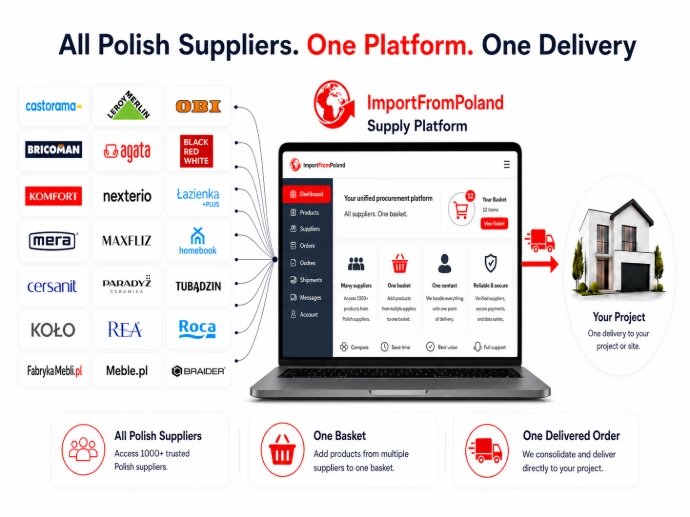
Use the Supply Platform as your project basket while browsing Polish online stores.
You can add products from different suppliers, save them in one place, return to them later, compare options and build your order gradually. Your baskets stay saved in your account, so you can organise your project over several days or weeks without losing progress.
STEP 2
Finding Products
Products are not searched for inside the Supply Platform.
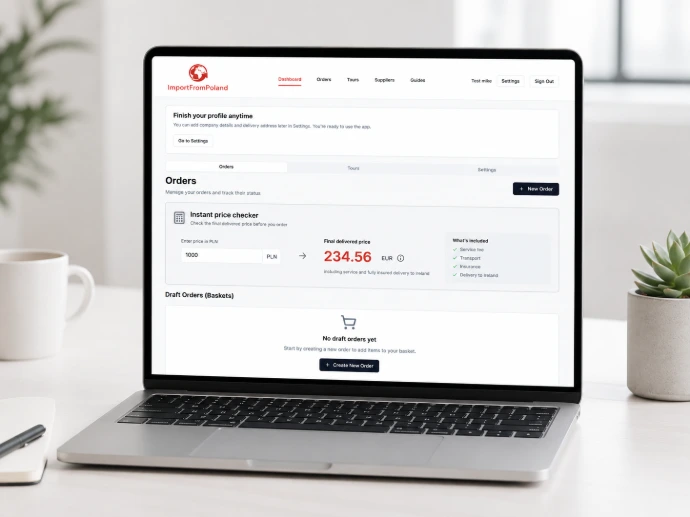
To build your basket, browse Polish online stores, supplier websites, catalogues and product pages. When you find something you like, you can check the delivered price using the Price Checker on the platform dashboard, and then decide whether to add the product to your basket.
The Price Checker is the quickest way to understand whether a product is worth considering. Simply enter the Polish price in PLN and the platform will instantly show you the exact EUR delivered price to your address in Ireland.
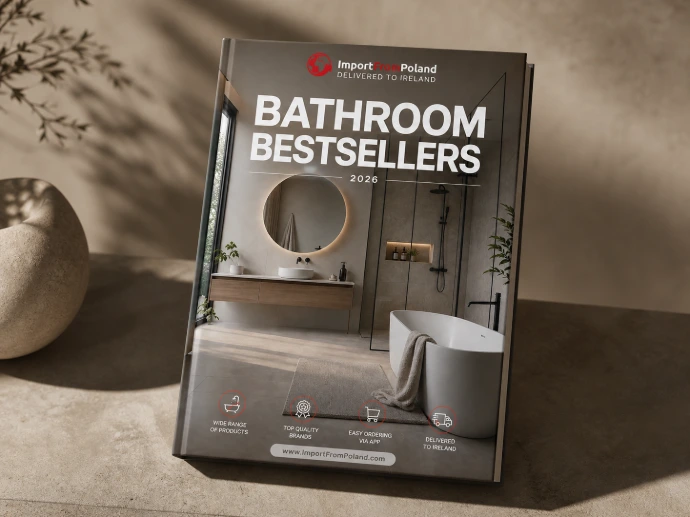
To make product searching easier, you can start with our Polish Materials Guide, our Supplier Directory or additional catalogues such as Bathroomware Bestsellers 2026 and ready-made bathroom sets.
We regularly create new catalogues and inspiration guides to help you discover useful Polish suppliers, popular products and project ideas more quickly.
Browse Polish online stores just like you would browse any other shopping website.
You can search by product category, brand, colour, finish, size or style. When you find a product that matches your project, copy its name, link, Polish price and quantity into your basket.
Useful product categories include bathroomware, tiles, flooring, lighting, fencing, insulation, paints, accessories, furniture and other finishing materials available from Polish retailers.
Before adding products to your basket, use the Price Checker on the Supply Platform dashboard.
Enter the Polish price in PLN and the platform will instantly show you the EUR delivered price to your address in Ireland.
This helps you quickly decide whether a product is worth saving, comparing or adding to one of your project baskets.
If you are not sure where to start, use our supporting resources first.
The Polish Materials Guide helps you understand where to look for different product categories. The Supplier Directory will give you a structured list of Polish stores and suppliers, and our additional catalogues — such as Bathroomware Bestsellers 2026 or ready-made bathroom sets — can help you find inspiration faster.
You can use these materials to choose products directly or simply as a starting point for your own search.
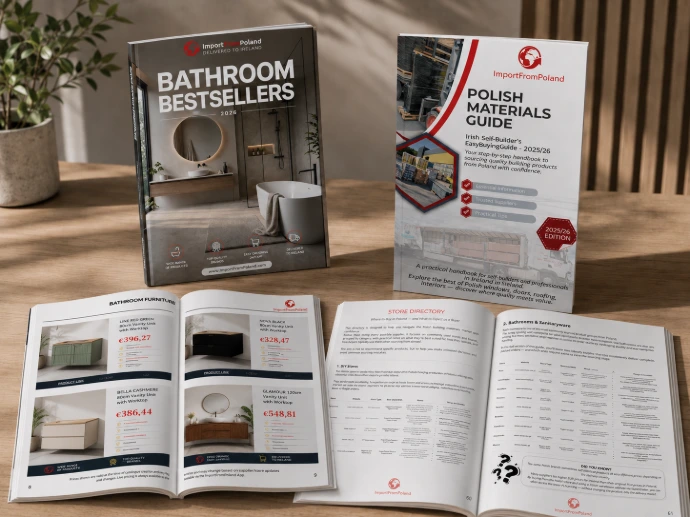
Start with trusted sources
Use our guides, catalogues and supplier directory to discover products faster
STEP 3
Adding Products to Your Basket
Once you find a product you would like to order or compare, add it to one of your baskets in the Supply Platform.
For each item, include the product name, direct product link, Polish price in PLN and the required quantity. These details allow us to identify the product correctly and verify it before your order is confirmed.
If the product has different options, such as colour, size, finish, left/right version or package type, add this information in the notes field.
You can add products from multiple Polish suppliers into the same basket, or create separate baskets for different rooms, categories or project stages.
At this stage, your basket does not need to be final. You can still edit quantities, remove items, add notes and compare alternatives before submitting the order.
Always copy the full product name and direct product link from the Polish store.
The direct link is especially important because many stores sell similar products with different sizes, colours, variants or specifications.
A clear product link helps us verify the correct item, check availability and reduce the risk of mistakes before your order is confirmed.
Enter the Polish price exactly as shown in the store and make sure the quantity matches the way the product is sold.
Some products are priced per item, while others may be priced per pack, box, square metre or set.
For tiles, flooring and similar products, check whether the store displays the price per m² or per box, and add a note if you are unsure.
Use the notes field to add any important information about the product.
This may include colour, finish, size, version, room name, preferred alternative or anything our team should check before confirmation.
Good notes are especially useful when comparing similar products or building baskets over several days or weeks.
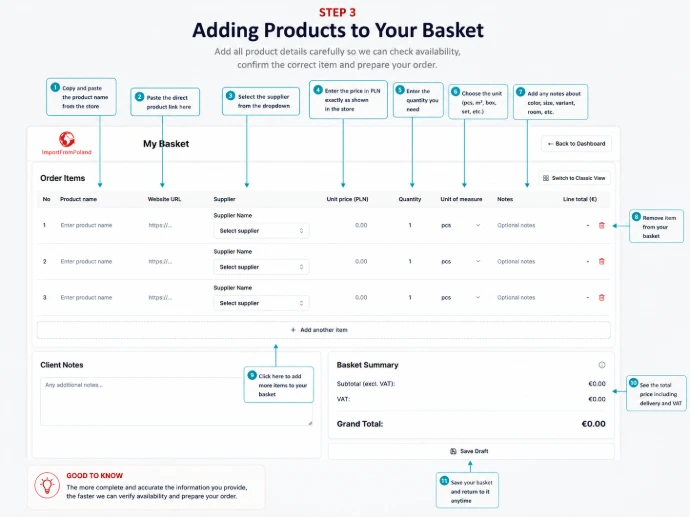
To add a product, you only need three key details: the product link, the Polish price and the quantity.
Product name, supplier and notes help us verify the item faster, but the link is the most important part.
STEP 4
Organising Your Baskets
You do not need to place your order immediately after adding products.
The Supply Platform allows you to create, save and edit multiple baskets, so you can organise your project in a way that makes sense for you.
Many users create separate baskets for different rooms, product categories or stages of their build, such as Bathroom 1, Bathroom 2, Flooring, Lighting, Garden & Fencing or Paints & Accessories.
Your baskets are saved to your account, so you can return to them later, make changes, compare alternatives and continue building your order over time.
This makes the platform useful not only for placing orders, but also for planning and budgeting your project.
Give each basket a clear name so you can easily find it later.
For example, instead of creating one large basket for everything, you may prefer to create separate baskets for each bathroom, flooring, lighting, garden products or finishing materials.
This keeps your project easier to review and makes it simpler to update individual sections later.
You can use separate baskets to compare different product options before making a final decision.
For example, you may create one basket with a more premium bathroom setup and another with a more budget-friendly version.
This allows you to compare delivered prices clearly and decide which option works best for your project.
Your baskets are saved to your account, not only in your browser.
This means you can start building a basket today, return to it next week, change quantities, add new products, remove items or update notes without losing your progress.
This is especially useful for larger projects where decisions are made gradually.
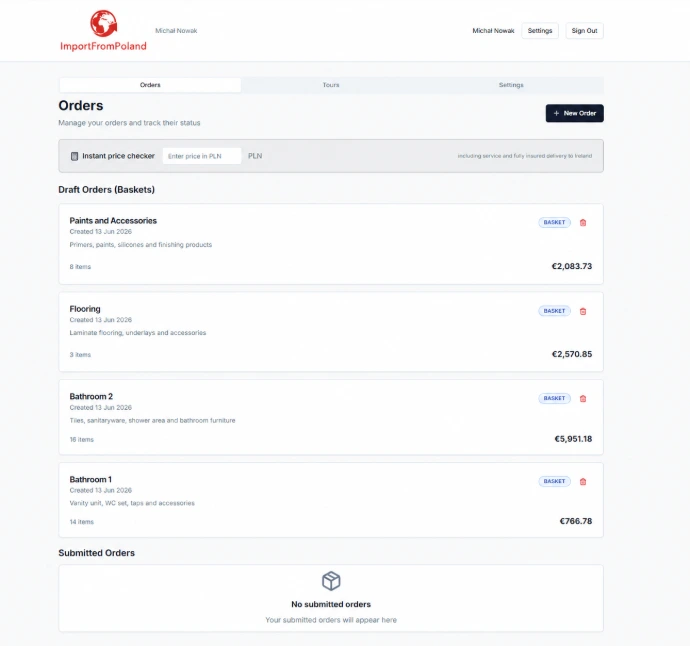
Your baskets are saved securely to your account, not only in your browser.
You can log in from any computer, return to your saved baskets, continue editing them, compare options and build your order over time.
STEP 5
Submitting Your Order
Once your basket is ready, you can submit it for review.
Submitting a basket does not automatically place the final order. It sends your selected products to our team so we can check product links, prices, quantities, availability and any notes you have added.
If everything is clear, we will confirm the order details and payment information. If something needs checking — for example a missing option, unclear quantity, unavailable product or longer preparation time — we will contact you before the order is confirmed.
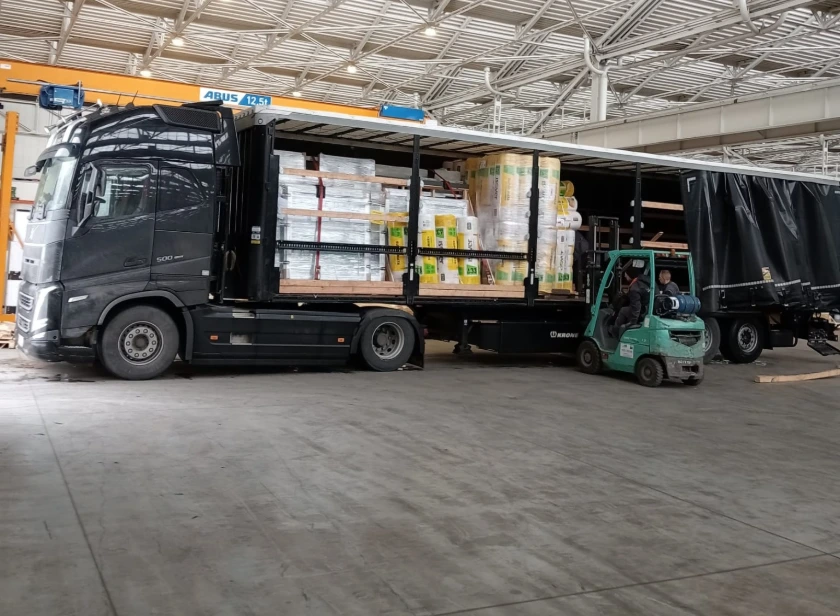
After the order is confirmed and paid, we begin completing your order and preparing it safely for international transport.
In most cases, this takes up to 5 working days. Once ready, orders are dispatched to Ireland by truck every Thursday.
Some products may require a longer preparation time. If this applies to your basket, we will let you know before the order is confirmed.
Before submitting your basket, quickly review the product links, prices, quantities and notes.
Make sure each item has enough information for us to identify it correctly. If a product has different colours, sizes, finishes or versions, add a short note to make your selection clear.
You can still edit your basket before submitting it.
After you submit your basket, our team reviews the products, prices, quantities, availability and any notes you have added.
If everything is clear, we will confirm the order details and payment information.
If anything needs clarification, we will contact you before the order is confirmed.
After payment, we begin completing your order and pack it securely for international transport.
In most cases, orders are ready within 5 working days and dispatched to Ireland by lorry on every Thursday.
If any product requires a longer preparation time, we will let you know before confirming the order.
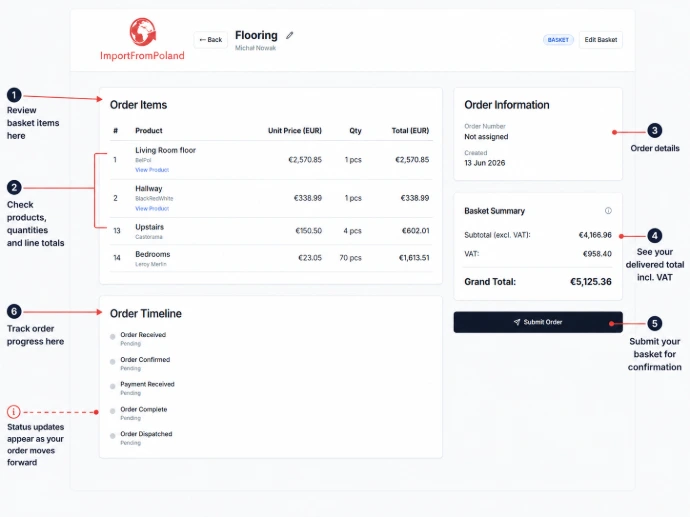
Submitting your basket sends it to our team for review.
After confirmation and payment, we complete your order, prepare it safely for international transport and dispatch it to Ireland on our regular Thursday truck.
Ready to Build Your First Basket?
Use the Supply Platform to check delivered prices, save products from Polish suppliers and build your order at your own pace.
Start with one product, one room or one project stage — you can always come back later and continue editing your baskets.
Frequently asked questions
Quick answers to the most common questions about using the Supply Platform, saving baskets, checking delivered prices and submitting orders for review.
Can't find the answer? Email it today to info@importfrompoland.com
Yes. You can add products from multiple Polish suppliers into one basket and manage them in one place.
Yes. Your baskets are saved to your account, so you can access them again after logging in, even from another computer.
No. Submitting a basket sends it to our team for review. We check the details before the order is confirmed.
Yes. You can edit products, quantities, notes and basket names before submitting the basket for review.
The platform works best for products available through Polish online stores, such as bathroomware, tiles, flooring, lighting, fencing, insulation, paints and finishing materials.
Use the Price Checker on your dashboard. Enter the Polish price in PLN and the platform will show the delivered price in EUR.